Introduction
This article explains how to verify that the EWS patch for Spindle Document Distribution has been successfully installed.
Following installation, there are a couple of simple checks that can be performed to confirm the patch is in place and functioning correctly. These include reviewing the installed programs on the machine, checking the processor logs for confirmation that the system is using the updated authentication method, and confirming that the installed version is 10.16 or later.
Note: For all stated methods, please ensure a screenshot is taken for confirmation, either during the session once the patch installation is complete, or requested from the customer if they have carried this out themselves.
It is also important to note that if the version is 10.16 or beyond, Method 1 will not be applicable as patch is in-built.
Methods to check EWS Patch
Method 1: Reviewing programs and features
Open the search bar and type Control Panel, then navigate to Programs > Programs and Features. Alternatively, typing "appwiz.cpl" in search bar brings you to the same page.
From here, check for an entry named Spindle Document Distribution (MS Exchange Patch). Refer to the screenshot:
This will confirm that the EWS Exchange Patch has been applied to the machine.
Method 2: Reviewing processor logs
Navigate to the following location on the machine:
Documents\My Draycir Logs\Spindle Document Distribution
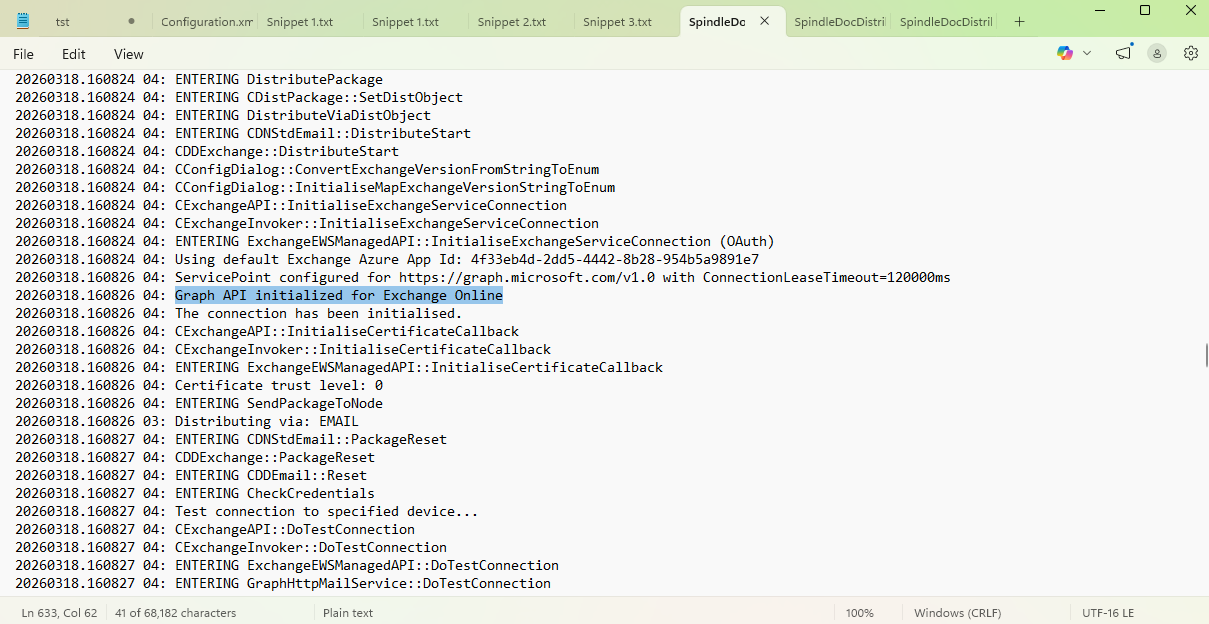
Open either the "SpindleDocDistributionTools_draycir.log" or the "SpindleDocDistributionProcessor_draycir.log".
Within the log, search for “Graph API initialized”. This confirms that the system is using the updated authentication method introduced by the patch. Refer to the screenshot:
Method 3: If version is 10.16(+)
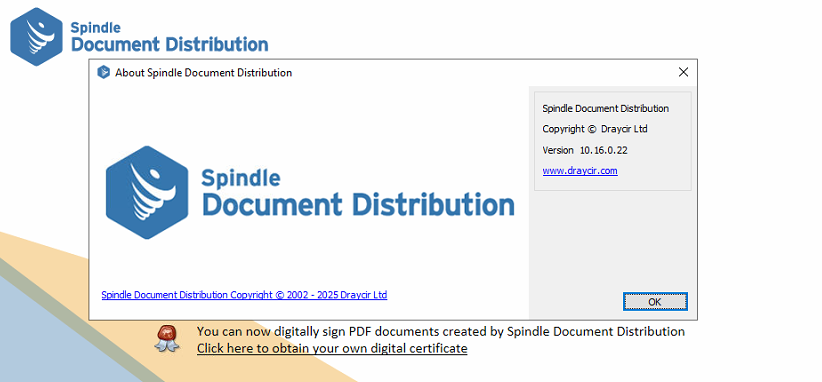
Check the installed version of Spindle Document Distribution. If the version is 10.16 or later, the EWS patch is built into the software and no separate installation is required. Refer to the screenshot:
Was this article helpful?
That’s Great!
Thank you for your feedback
Sorry! We couldn't be helpful
Thank you for your feedback
Feedback sent
We appreciate your effort and will try to fix the article