What is the Exchange Online Patch?
The Exchange Online Patch is a separate installation that works alongside your existing Spindle Document Distribution, Spindle Document Distribution Cloud or Spindle Document Management software, hereafter referred to collectively as "Spindle".
The Patch enables Spindle to use the updated email method required for Exchange Online, ensuring continued document distribution following Microsoft’s deprecation of Exchange Web Services (EWS).
For further details, please refer to the related Knowledge Base article.
How do I install the patch?
The patch can be downloaded using this link.
A full installation guide is included with the download and should be followed during setup.
Note: Please ensure Spindle Document Distribution Tools (and any other Spindle related applications) are closed during the installation process.
What order should be used when installing Spindle and the Patch?
When installing both Spindle Document Distribution and the Exchange Online Patch please ensure that Spindle is installed first on each client PC, then install the patch.
What happens when I upgrade Spindle in the future?
Upgrading to version 10.16 or later
If you upgrade to version 10.16 or higher of:
Spindle Document Distribution
Spindle Document Management
Spindle Document Distribution Cloud
The updated email method is already included. During the upgrade process, the Exchange Online Patch will be automatically uninstalled. Standard upgrade instructions apply.
Upgrading to a version earlier than 10.16 (e.g. 8.15 to 10.3)
A repair installation of the Exchange Online Patch will be required on each client PC after the upgrade is completed.
Are there alternative options?
Yes. You may follow the standard upgrade process instead of installing the patch. However, you must upgrade to version 10.16 or later of the relevant Spindle software to ensure compatibility with Exchange Online.
Does installing the patch give me the latest Spindle Document Distribution features and functionality?
No, the patch has been specifically designed to allow Spindle Document Distribution to use Microsoft Graph to send emails using Exchange Online without interruption when EWS is retired.
Who does not need to install the patch?
Any Spindle users that use the below email connectors:
- Exchange On Premise
- SMTP
- Gmail
- Outlook
- Legacy Outlook
- MAPI
- Lotus/IBM/HCL Notes
- David 6/XL (Tobit)
You can confirm which email connector is in use by accessing Spindle Document Distribution Tools on a user's PC and opening the User Settings > Email settings, and observing which default email connector is in use.
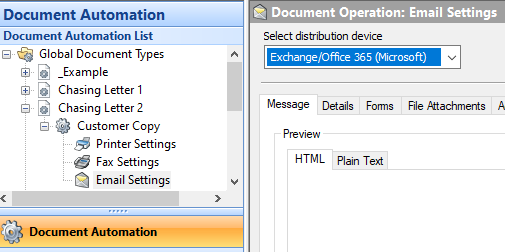
Please note that if Exchange Online is being used as an override email connector method at automation level (Document Automation > Select + next to the automation > Email Settings and check the distribution device selected), the site will need the patch to be applied. An example of this is shown below:
Any sites that do not require the patch should still ensure they meet the minimum supported version of the software to receive support.
How are authentication tokens handled and stored?
Authentication tokens are handled and stored in the same manner as previous versions of the application. Tokens are stored within the user's AppData profile (either Local or Roaming, depending on the configuration selected in the application's Tools settings). This ensures that tokens are restricted to a specific user on a specific machine and are not shared across users or devices.
What exact permissions are being requested/granted/Are these delegated or application permissions?
The application requests delegated permissions. This means access is granted in the context of the signed-in user and is limited by that user's existing permissions within Microsoft 365.
Does the application have access only to the signed-in user's
mailbox, or could it access other mailboxes?
The application operates using the permissions of the authenticated user. By default, users can access their own mailbox. If a user has been granted access to additional mailboxes, such as shared mailboxes, the application will also be able to interact with those mailboxes to the same extent that the user can.
Does the solution support our existing Conditional Access and MFA policies?
Yes. The solution supports Microsoft Entra ID authentication, including Multi-Factor Authentication (MFA). In general, if your existing authentication and security policies worked with previous versions, they should continue to function with the new version.
Are there any tenant-wide security implications associated with granting consent?
Microsoft Entra ID provides options to control who can grant consent to applications. If required, consent can be restricted to designated users or administrators. Many customers choose to use the administrator consent process, as it simplifies deployment and removes the ongoing administrative overhead of maintaining an approved user list.
What data leaves our environment, and where is it processed?
The Spindle application and associated permissions do not collect, transmit, or process customer data outside of the Microsoft services required for operation. We do not use the application permissions to collect or process data independently.
What happens if Microsoft Entra ID or Exchange Online is unavailable?
As the solution relies on Microsoft Entra ID and Exchange Online services for authentication and mailbox access, any outage or service disruption affecting those platforms may impact Spindle's functionality until the Microsoft services are restored.
How can the application consent be revoked if Spindle is retired or the application is compromised?
Application access can be revoked at any time through Microsoft Entra ID by removing the application's Enterprise Application or App Registration entry, depending on your deployment method. This immediately prevents further authentication and access through the application.
Was this article helpful?
That’s Great!
Thank you for your feedback
Sorry! We couldn't be helpful
Thank you for your feedback
Feedback sent
We appreciate your effort and will try to fix the article